Showing posts with label tips. Show all posts

Wednesday, March 4, 2015

Tips: What to do when your iPhone 5s got hang?


Press the Start button (on the top right of the iPhone) and the Home button simultaneously. Your screen will become white. Press and wait for about 10 seconds until the Apple logo appears. 

Based on my own experience after googled the solutions with some try-and-error. 

Mine happened after I downloaded the latest iOs 8.1.3. 


Couldn't even slide to unlock. And the clock stayed still. 

Cuak hokeyh. 

Alhamdulillah all is fine now. Big thanks to my lovely friend who took the effort to google and help me with the try-and-error process. 

Thursday, June 19, 2014

Tips: How To Manage Your Stress


Credit to instagram milik pelakon comel Lisa Surihani @lisasurihani_23 

Jangan lari dari masalah. Ia tidak menyelesaikan masalah. 

Jangan pula merenung masalah itu lama-lama. Ia hanya merencatkan anda. 

Bila ada masalah dan anda rasa stress, letak sekejap masalah ke tepi, buat aktiviti yang boleh release stress anda (window shopping/shopping, dengar lagu, solat, baca Quran dan sebagainya), kemudian hadapinya dengan strategi bijak untuk menyelesaikannya. 

Berbincang adalah langkah terbaik. Pastikan anda memilih orang yang betul untuk berbincang. 

1. Orang yang kenal diri anda. 
2. Pandai 'mendengar'.
3. Bukan batu api tapi menenangkan hati dan menawarkan solusi. 

Masalah dan stress adalah sebahagian dari rencah hidup. Hadapinya dengan bijak akan mematangkan diri. All the best to us :-)

Muah! -xoxo-


Wednesday, June 12, 2013

Nak install Facebook Like Button Plugins kat Blogger?


Hi Beautiful Readers~

Ok tak my new blog theme? Sempena post ke 501 kononnya..hihi..personally I found it refreshing dan luas sikit mata memandang :-p

Bila da tukar theme nie, biasa laa ada some plugins and widget mesti hilang. But since I stick to blogger template, so almost all maintain except for one:

-The Facebook Like Button-
 
I kena cari balik the steps and luckily, masa my TLC mentor CDM Al-Faath Al-Ayubbi yang first sekali tolong masukkan button Facebook tu, I tengok step by step. Macam samar-samar but alhamdulillah manage to recall. The moral of the story here is please focus when your teaching is teaching :-D

Sebab I tak nak pisang berbuah berkali-kali (coz I nie rajin tukar theme, rasa bosan je tukar), I buat keputusan nak abadikan satu entri tentang cara-cara untuk install balik this Facebook Like Button plugins untuk kebaikan kita bloggers bersama.

So here it goes.

How to Add the Facebook Like Button Below every Post

1. First Generate the Facebook code using the options below. (Code will be updated with these details)
Button Type
Text on Button
Show Send Button
Color Scheme
Font
Float
Location of the Button
Display
 
<div>
<b:if cond='data:post.isFirstPost'> 
<script>(function(d){
  var js, id = 'facebook-jssdk'; if (d.getElementById(id)) {return;}
  js = d.createElement('script'); js.id = id; js.async = true;
  js.src = "//connect.facebook.net/en_US/all.js#xfbml=1";
  d.getElementsByTagName('head')[0].appendChild(js);
}(document));</script>
</b:if> 
<fb:like expr:href="data:post.canonicalUrl" layout='standard' send='true' show_faces='false' font="arial" action="like" colorscheme="light"></fb:like>
</div>

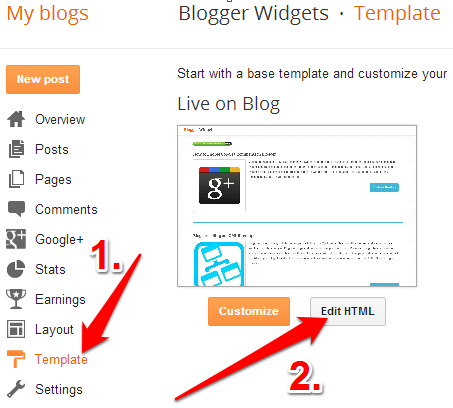
2. Copy the Above code. Login to your Blogger Account and go to Template > Edit HTML
blogger-edit-html
Click somewhere within the Template Editor and press Ctrl + F to search within the template.
3. Search for <data:post.body/> and immediately above that code, place the copied code.
search-for-data-post-body-blogger
If you find multiple occurrences of <data:post.body/> , do the same for each of them.

Senang je kan? Just follow step by step and you'll be fine baby! All the best!

(Kalau tak jadi pls give me feedback tau)

Love,
Iynas Omar

Monday, January 14, 2013

Tips to save cost on re-installation of Unifi

Assalamualaikum all~

Yeay, the Unifi is back!

The white STB box (please ignore the 'corong' hehe)


If you are a Unifi user, and thinking of fully renovating the house, please take note. Perhaps what I am going to share here is not the best solution to save cost on Unifi, but I am sharing this based on my experience after moving in. I think the same method can be used if one decides buying a new house at different location.


Tips:
  1. Pack all Unifi stuffs as per the above photo in one special box labeled "UNIFI". Please don't forget the white STB box which is located usually at the back of a house. I did forgot about this white box and the contractor threw it away, which almost cost me another RM500.00 just for the white box. After admitting my mistakes and an expression of disappointment as a loyal user, the TM called me to inform that it is under warranty. So the RM500.00 is waived. Phew!
  2. Don't hold the account. Just continue paying RM149.90 monthly. You will be charged RM300.00 for holding the account, and RM500.00 if you choose to terminate the account before contract maturity of 2 years. This is why I voiced out my disappointment as a loyal user of Unifi when previously they intended to charged me RM500.00 for the white box.
  3. Get everything done at single appointment! Unless, you will be charged RM200.00 for the next appointment. I am not kidding, coz I almost get charged due to wiring problem by the contractor.
  4. Be friendly and make friends with the technicians. We even keep their mobile numbers for further reference. You will not know if you need their further help at cheaper cost without having to call TM and go along the process of waiting and listening to the on-hold music for half an hour. Instead of having to pay RM200.00 for re-installation, my sister paid him RM150.00 coz the technician is very kind to inform me about (3) and he is willingly to do it outside office hours. He asked for half the re-installation payment but my sister paid him extra for his kindness.

So yeay! Yeay and yeay!

Unlimited access to the outside world, and people, and opportunity, and knowledge. Most importantly, save on my mobile data for online business and marketing! Wink!